Torque App Question

djenkins040

Member
Joined
May 30, 2025
Posts
7
Location
Arizona
I have a 2008 Jeep JK that is basically a 2018 Silverado 1500. It is running the 5.3 and 8 speed transmission with the Chevy ECU. I use the Torque App as a aux dashboard to be able to read details from the ECU. It has a working dash, but those gauges were pretty lame and prefer to the more granular details.

Here is my issue, looking for the PID and parameters for the Fan. I know it is working as advertised as I can monitor it using the HP tuners VCM scanner. Using HP tuners can see the % of fan change as temp increase of if running the AC. My problem is how to get the information for this to create an Extended PID for the Torque App. Hoping someone on the forum has tackled this. WIll post the PID and configs I have tried.

OBD2 Mode: 22163F01 -Fails with the 01, the 01 is supposed to help with faster polls
Long Name: Desired Fan Speed
Short Name: Fan Speed
Minimum Value: 0
Maximum Value: 5000
Scale Factor: x1
Units: RPM
Equation: A * 16
OBD Header: Auto

OBD2 Mode: 22163F - Looks to poll but never registers
Long Name: Desired Fan Speed
Short Name: Fan Speed
Minimum Value: 0
Maximum Value: 5000 - Have done this using 5000 or 100 no difference
Scale Factor: x1
Units: RPM
Equation: A * 16
OBD Header: Auto

Have tried using above and changing PID to 22162B01, as I read some Silverado models, fan speed may be reported as Duty Cycle (%) instead of RPM.

Again, hoping there is a Torque App guru who has been through this.

[Mod edit]: Other thread in full size truck section deleted as it was a cross post to this one.
 
Last edited by a moderator:
I have a 2008 Jeep JK that is basically a 2018 Silverado 1500. It is running the 5.3 and 8 speed transmission with the Chevy ECU. I use the Torque App as a aux dashboard to be able to read details from the ECU. It has a working dash, but those gauges were pretty lame and prefer to the more granular details.

Here is my issue, looking for the PID and parameters for the Fan. I know it is working as advertised as I can monitor it using the HP tuners VCM scanner. Using HP tuners can see the % of fan change as temp increase of if running the AC. My problem is how to get the information for this to create an Extended PID for the Torque App. Hoping someone on the forum has tackled this. WIll post the PID and configs I have tried.

OBD2 Mode: 22163F01 -Fails with the 01, the 01 is supposed to help with faster polls
Long Name: Desired Fan Speed
Short Name: Fan Speed
Minimum Value: 0
Maximum Value: 5000
Scale Factor: x1
Units: RPM
Equation: A * 16
OBD Header: Auto

OBD2 Mode: 22163F - Looks to poll but never registers
Long Name: Desired Fan Speed
Short Name: Fan Speed
Minimum Value: 0
Maximum Value: 5000 - Have done this using 5000 or 100 no difference
Scale Factor: x1
Units: RPM
Equation: A * 16
OBD Header: Auto

Have tried using above and changing PID to 22162B01, as I read some Silverado models, fan speed may be reported as Duty Cycle (%) instead of RPM.

Again, hoping there is a Torque App guru who has been through this.

[Mod edit]: Other thread in full size truck section deleted as it was a cross post to this one.


I would try changing the header(s) from "Auto" to "7E0" if using ISO 15765-4 Canbus or "6C10F1" for the much older SAE J1850VPW single wire Class II data bus. I think you said you are using a 2018 ECU so "7E0" would be the one to try.
 
I would try changing the header(s) from "Auto" to "7E0" if using ISO 15765-4 Canbus or "6C10F1" for the much older SAE J1850VPW single wire Class II data bus. I think you said you are using a 2018 ECU so "7E0" would be the one to try.
Thank you I will try that. For context it is a 0 "Zero" not an O, correct?
 
I would try changing the header(s) from "Auto" to "7E0" if using ISO 15765-4 Canbus or "6C10F1" for the much older SAE J1850VPW single wire Class II data bus. I think you said you are using a 2018 ECU so "7E0" would be the one to try.
Tried the 7E0 and no luck. It seems the PIDs exist or at least can connect but not sure which PID is Desired Fan Speed. I know it can be read as I can see the Desired Fan Speed using HP Tuners and the VCM editor plugged into the ODBII adaptor.
 

Attachments

  • IMG_3154.jpg
    IMG_3154.jpg
    126.7 KB · Views: 3
  • IMG_3155.jpg
    IMG_3155.jpg
    119.7 KB · Views: 3
  • IMG_3156.jpg
    IMG_3156.jpg
    84.2 KB · Views: 3
Tried the 7E0 and no luck. It seems the PIDs exist or at least can connect but not sure which PID is Desired Fan Speed. I know it can be read as I can see the Desired Fan Speed using HP Tuners and the VCM editor plugged into the ODBII adaptor.


Out of curiosity,,, before changing the header,,, was the response the same "7E00461163F00" or similar ??
 
Out of curiosity,,, before changing the header,,, was the response the same "7E00461163F00" or similar ??
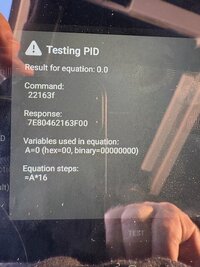
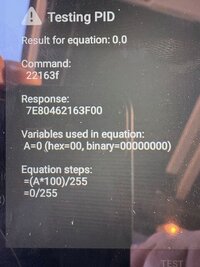
Tested this and below are the results. Short summary, using Torque and testing the PID, no matter what the configuration of variables did not see data other than 000 no activity. Looking at other PID with the vehicle running and doing test, can see the active feedback of the data as the range changes.

Unsure of this just might be an item where it is not exposed to Torque or ?

Test 6/5/2025
pid 22163f
test with (A*100) /255 % 7E0 - no change
test with (A*100) /255 % auto - no change
test with A*16 % 7E0 - no change
test with A*16 % Auto - no change
test with (A*100) /255 rpm 7E0 - no change
test with (A*100) /255 rpm auto - no change
test with A*16 rpm 7E0 - no change
test with A*16 rpm Auto - no change


pdi 22162b
test with (A*100) /255 % 7E0 - no change
test with (A*100) /255 % auto - no change
test with A*16 % 7E0 - no change
test with A*16 % Auto - no change
test with (A*100) /255 rpm 7E0 - no change
test with (A*100) /255 rpm auto - no change
test with A*16 rpm 7E0 - no change
test with A*16 rpm Auto - no change


Sensor PID Equation Units Notes
Fan Desired Speed 22163F A * 16 RPM Converts raw data to RPM.
Fan Actual Speed 22162B A * 16 RPM Confirmed on earlier models; compatibility may vary.
Fan Duty Cycle 22163F (A * 100) / 255 % Represents the PWM signal percentage.

I know the fan is PWM as that can be verified using HP tuners for the Fan config.
 
Tested this and below are the results. Short summary, using Torque and testing the PID, no matter what the configuration of variables did not see data other than 000 no activity. Looking at other PID with the vehicle running and doing test, can see the active feedback of the data as the range changes.

Unsure of this just might be an item where it is not exposed to Torque or ?

Test 6/5/2025
pid 22163f
test with (A*100) /255 % 7E0 - no change
test with (A*100) /255 % auto - no change
test with A*16 % 7E0 - no change
test with A*16 % Auto - no change
test with (A*100) /255 rpm 7E0 - no change
test with (A*100) /255 rpm auto - no change
test with A*16 rpm 7E0 - no change
test with A*16 rpm Auto - no change


pdi 22162b
test with (A*100) /255 % 7E0 - no change
test with (A*100) /255 % auto - no change
test with A*16 % 7E0 - no change
test with A*16 % Auto - no change
test with (A*100) /255 rpm 7E0 - no change
test with (A*100) /255 rpm auto - no change
test with A*16 rpm 7E0 - no change
test with A*16 rpm Auto - no change


Sensor PID Equation Units Notes
Fan Desired Speed 22163F A * 16 RPM Converts raw data to RPM.
Fan Actual Speed 22162B A * 16 RPM Confirmed on earlier models; compatibility may vary.
Fan Duty Cycle 22163F (A * 100) / 255 % Represents the PWM signal percentage.

I know the fan is PWM as that can be verified using HP tuners for the Fan config.


The significant thing is not what is done with the equation variable(s) or the result of the equation.

A response of "7E80462xxxx00" where "xxxx" is the PID is indicative that the ECM has replied to your query and returned a value of "00" for the token (variable) "A".

This means your ECM likely does not use those PIDs for fan data.

I was curious if the response seen when the header is Auto is still 7E00462xxxx00 or "NO DATA".
 
The significant thing is not what is done with the equation variable(s) or the result of the equation.

A response of "7E80462xxxx00" where "xxxx" is the PID is indicative that the ECM has replied to your query and returned a value of "00" for the token (variable) "A".

This means your ECM likely does not use those PIDs for fan data.

I was curious if the response seen when the header is Auto is still 7E00462xxxx00 or "NO DATA".
Really appreciate the responses. This exercise has been very informative and a learning experience. I went through your long post, like 18 pages or so and that was a lot to read.

Looking at the breakout you sent.

7E8 046 2xxxx 00 is it safe to break out the response in this manner

7E8 - Header identifies Module
046- ?
2XXXXX - PID
00 - Response

Module:
Standard OBD-II: 7E0 or 7E8 (ECM/PCM)
Extended GM modules: 7E2 (BCM), 7E4 (HVAC), 7E5 (TCM), etc.

Ultimately I was able to also find some additional PIDs through multiple tabs of google searches. Still searching for a master list but those seem to hard to find.

221640 & 221641 are alternate PIDs for the fan.

Working config: Verified with HP Tuners to match the programed % of fan 15% ramping as temp increases and then 15% increase added when AC is engaged, max combo's keep total % to 80
7E0 221640 ECM alternate fan control (A*100)/255 %

List of PID candidates, unsure of how this breaks out to model year, just sharing data that was found.

PID Candidates
Header Mode + PID Description Equation Units
7E2 22163F Fan Duty Cycle (first guess) (A*100)/255 %
7E2 221640 Alternate Fan Command (A*100)/255 %
7E2 221641 Alternate Fan Command 2 (A*100)/255 %
7E0 22163F Same PID on ECM (A*100)/255 %
7E0 221640 ECM alternate fan control (A*100)/255 %
7E8 22163F Another possible ECM module (A*100)/255 %
7E8 221640 ECM alternate (A*100)/255 %


Again, really appreciate the responses and the information, always happy to discuss this type of pf stuff.
 
Looking at the breakout you sent.

7E8 046 2xxxx 00 is it safe to break out the response in this manner

7E8 - Header identifies Module
046- ?
2XXXXX - PID
00 - Response


Close.....


PIDs are 2 bytes, the "22" preceding the PID is the "mode" or more accurately the "service" offered by the controller. So when Torque lists "mode and PID" the 22 is mode and the next 4 characters (2 bytes) are the PID.

The message breaks out something like this 7E022163F is seen as 7E0 22 163F and the response will be seen as 7E8 04 62 163F xx where xx is the value (assuming a single byte value).


7E8: response will be xx8 greater than header so 7E8 will be response to 7E0. 7E2 will be answered at 7EA

04: means there will be 4 bytes data response.

62: this is acknowledgement to the mode/service request of "22" seen just prior to the PID. A response will add 4x to the mode/service request. So "22" is answered as "62".

Next will be the data value which can be 1 byte or more.


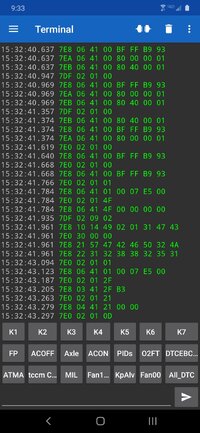
Here is a screenshot of some traffic as an example..

Look specifically at timestamp 15:32:41.619. You will see "7E0 02 01 00". This is a request to identifier "7E0" using mode "02" and asking for PID "01 00". The very next line shows a response to identifier "7E8" (7E0 + 008) sending "06" bytes, identifying the response as "41 00" (01 00 + 40 00), and then a 4 byte return value of "BF FF B9 93". I am less knowledgeable about CAN frames but I think this here is dealing with the freeze frame data of the monitor status. Maybe. Regardless, it sort of shows what I was talking about up above.


Screenshot_20200721-213344_Serial Bluetooth Terminal.jpg
 
I have a 2008 Jeep JK that is basically a 2018 Silverado 1500. It is running the 5.3 and 8 speed transmission with the Chevy ECU. [...] looking for the PID and parameters for the Fan.
I hooked up my DIY CAN vehicle simulator (discussed in 3 sequential posts, starting here) with my VXDIAG VCX Nano (OBD2 SAE J2534 pass-thru adapter) and ran the GDS2 software that came with the VCX Nano.

I tweaked my simulator to send a VIN (1GCVKREC1JZ190735) for a random 2018 Silverado 1500 vehicle, garnered via a quick Internet search. This causes GDS2 to recognize the simulated vehicle as a "2018 Chevrolet Silverado".

GDS2 then wants to know the engine type, apparently unable or unwilling to discern that from the VIN. On this vehicle, for your specification of a 5.3-liter engine, there are 2 options: "L83" and "L8B". :confused: So I guessed and used the former.

For that vehicle/configuration, the ECM at CAN ID $7E0 reports a "Cooling Fan Command" PID, by querying Mode $22 PID $1641, returning a single byte ("A") in the reply. The formula works out to "A*100/255", in percent.

So I strongly suspect that that PID would work with your (Chevy) ECM. Please let us know if this works (or not!).

I note that your "PID candidates" list already showed that PID, but for the ECU at CAN ID $7E2. On this vehicle, that should be the TCM (Transmission Control Module), so I'd be surprised if that PID would ever work with that CAN ID!

BTW, there are no other PIDs related to cooling fans as reported by GDS2 for that vehicle/configuration. Specifically, there is no "Desired Fan Speed (RPM)" or "Actual Fan Speed (RPM)" available. But be aware that the 6.x-liter engines' PCMs behave differently.

I hope that's all clear and works well. But if you have any problems, let us know.

Look specifically at timestamp 15:32:41.619. You will see "7E0 02 01 00". This is a request to identifier "7E0" using mode "02" and asking for PID "01 00".
A minor correction/clarification to this... The "02" in the "7E0 02 01 00" command is actually the message length, not an OBD2 Service/Mode specification. So the command is actually a Mode $01 command for PID $00 ("Supported PIDs").

Generally speaking, the whole story is a bit more complicated because, frankly, CAN transmission/reception is a bit more complicated than SAE J1850 VPW (i.e. what GM calls "Class 2 serial data"). I mentally struggle when I jump between SAE J1850 (VPW or PWM) and CAN, especially now that I am versed in GM's SW-CAN in addition to the old, familiar HS-CAN and MS-CAN. :helpme::stars:
 
  • Like
Reactions: TJBaker57
I hooked up my DIY CAN vehicle simulator (discussed in 3 sequential posts, starting here) with my VXDIAG VCX Nano (OBD2 SAE J2534 pass-thru adapter) and ran the GDS2 software that came with the VCX Nano.

I tweaked my simulator to send a VIN (1GCVKREC1JZ190735) for a random 2018 Silverado 1500 vehicle, garnered via a quick Internet search. This causes GDS2 to recognize the simulated vehicle as a "2018 Chevrolet Silverado".

GDS2 then wants to know the engine type, apparently unable or unwilling to discern that from the VIN. On this vehicle, for your specification of a 5.3-liter engine, there are 2 options: "L83" and "L8B". :confused: So I guessed and used the former.

For that vehicle/configuration, the ECM at CAN ID $7E0 reports a "Cooling Fan Command" PID, by querying Mode $22 PID $1641, returning a single byte ("A") in the reply. The formula works out to "A*100/255", in percent.

So I strongly suspect that that PID would work with your (Chevy) ECM. Please let us know if this works (or not!).

I note that your "PID candidates" list already showed that PID, but for the ECU at CAN ID $7E2. On this vehicle, that should be the TCM (Transmission Control Module), so I'd be surprised if that PID would ever work with that CAN ID!

BTW, there are no other PIDs related to cooling fans as reported by GDS2 for that vehicle/configuration. Specifically, there is no "Desired Fan Speed (RPM)" or "Actual Fan Speed (RPM)" available. But be aware that the 6.x-liter engines' PCMs behave differently.

I hope that's all clear and works well. But if you have any problems, let us know.


A minor correction/clarification to this... The "02" in the "7E0 02 01 00" command is actually the message length, not an OBD2 Service/Mode specification. So the command is actually a Mode $01 command for PID $00 ("Supported PIDs").

Generally speaking, the whole story is a bit more complicated because, frankly, CAN transmission/reception is a bit more complicated than SAE J1850 VPW (i.e. what GM calls "Class 2 serial data"). I mentally struggle when I jump between SAE J1850 (VPW or PWM) and CAN, especially now that I am versed in GM's SW-CAN
Yes, the working PID is below, sorry it was a long post and should have been clear on the final. That section was additional information I found from doing many different searches.

[GM] Desired Fan Speed (Extended PID created manually)
Fan Duty Cycle
PID = 221641
Min 0
Max 100
Scale = x1
Unit = %
Equation = (A*100)/255
Header = 7E0
 
  • Like
Reactions: AmpOverload

Forum Statistics

Threads
24,315
Posts
649,204
Members
20,852
Latest member
needsnumbers

Members Online